In partnership with


Most reps treat outbound like a game of chance - spray 100 messages and pray someone bites. But great sellers don’t rely on luck. They rely on signals. These are the subtle clues hidden in job posts, LinkedIn activity, or role changes that reveal when a buyer is actually ready to talk. And when you spot them early, you can start more conversations in fewer touches - no fancy AI stack required.
In this issue, we’ll break down the three most powerful signals top reps use (and the exact messages to send when you see them).
SPONSORED BY ROKU
Shoppers are adding to cart for the holidays

Over the next year, Roku predicts that 100% of the streaming audience will see ads. For growth marketers in 2026, CTV will remain an important “safe space” as AI creates widespread disruption in the search and social channels. Plus, easier access to self-serve CTV ad buying tools and targeting options will lead to a surge in locally-targeted streaming campaigns.
Read our guide to find out why growth marketers should make sure CTV is part of their 2026 media mix.
SALES
3 Signals Every Rep Should Leverage
There’s a lot of buzz around signals, buying intent and AI account research right now.
Why? Because most reps still treat outbound like a timing lottery. They blast the same generic message across 100 accounts and hope they get lucky.
But the best outbound reps book more meetings in fewer touchpoints by finding the right account, the right person, and sending the right message – at the right time.
Although the tech to detect these signals and research accounts at scale has become much better, using signals (or what I used to call triggers) is not new.
Signals have been around forever and I’ll show you my 3 favorite signals you can use even if you don’t have a fancy tech stack:
Job Listing Signals
Social Engagement Signals
Job Change Signals
I’ll also give you personalized messaging to use for each of these signals. Let’s get into it!
1: Job Listing Signals
This is one of my favorites. Job postings have an insane amount of information about a company and its strategic direction. You get to see first hand from the job titles and descriptions:
What initiatives they are investing in: If they are hiring heavily on the Enterprise side, you should use language that mentions how you can specifically help them build that.
What locations they are hiring: If they are expanding into a new region, it could be a great reason for your solution (i.e. Let’s say you have great contact data in Europe. A new market could mean they need different contact data to reach out to European prospects).
What tech stack they use: Depending on what they’re using, knowing their tech stack could help you build a narrative around integrations, consolidation or replacements with competitive tech.
How they talk about the problems: When reaching out, you want to use your prospect’s words. Pay attention to how they formulate the initiatives and problems they are looking to solve.
What the org / reporting structure looks like: Knowing who reports to who makes it easier to map your accounts and establish your plans for prospecting + multithreading.
Here’s an example of outreach where I use information from their tech stack (from a job posting) to sell an Account-Based Marketing software:

Our team has been seeing 20%+ reply rates across sequences when we get to prospects within 24 hours of them leaving social signals.
A social signal is when a prospect engages with something on social media related to problems that your company solves – which means they’re aware of the problem you solve.
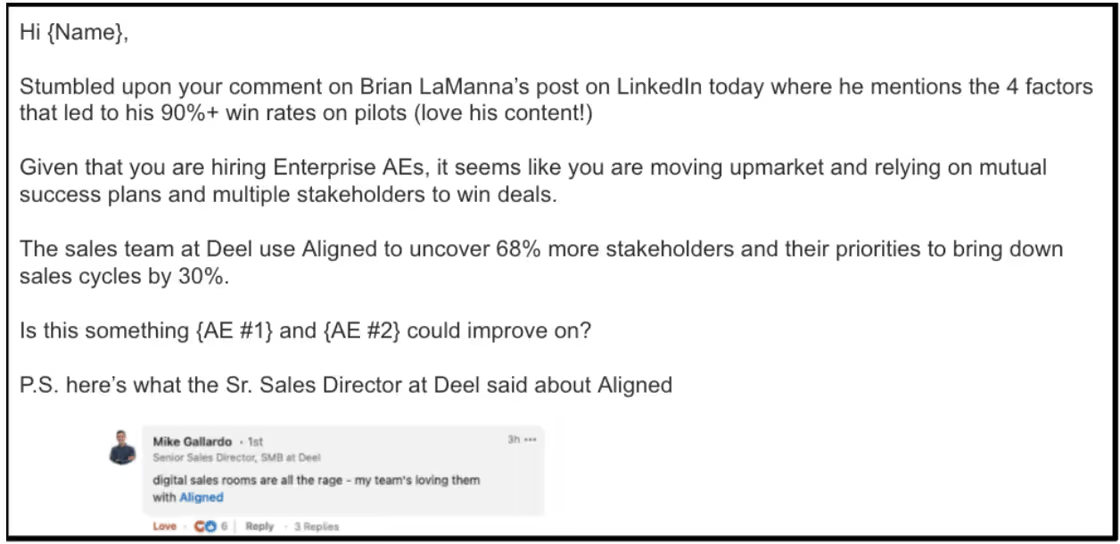
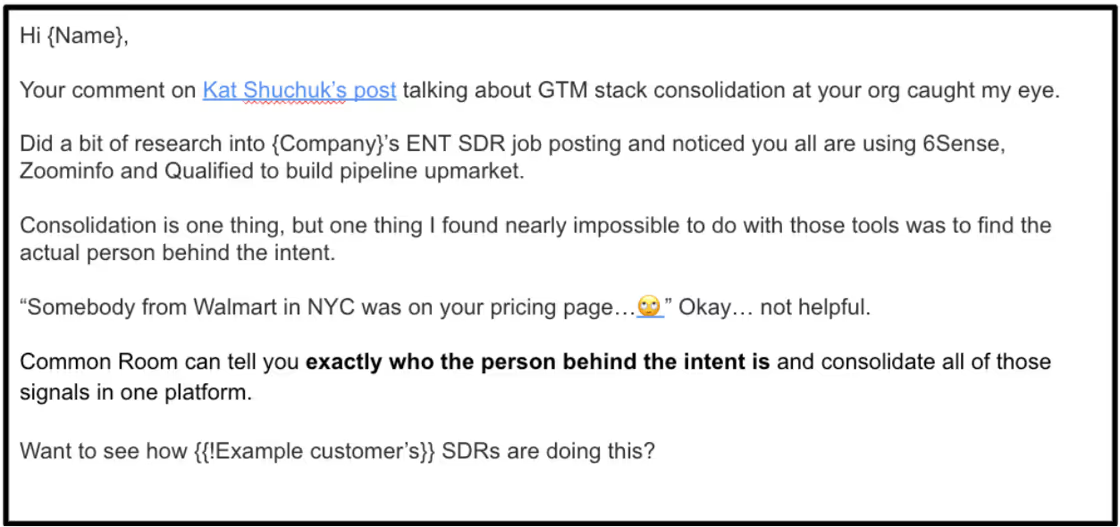
When I’m reaching out to people that display social signals, I send an email using this simple 5-sentence framework:
Observation based on LinkedIn post
Company wide signal/observation (tied to context from post)
Ideal state w/ social proof
Light Call-to-Action
P.S. any extra personalization
Important note: Don’t let the fact that somebody reacted to a post be your only reason for reaching out! Use that social signal and tie it to something you’ve seen across their business as well.
Example #1: Prospect Engaged With Content That You Solve For
Example #2: Prospect Engaged With Content From Your Competitors
3: Job Change Signals
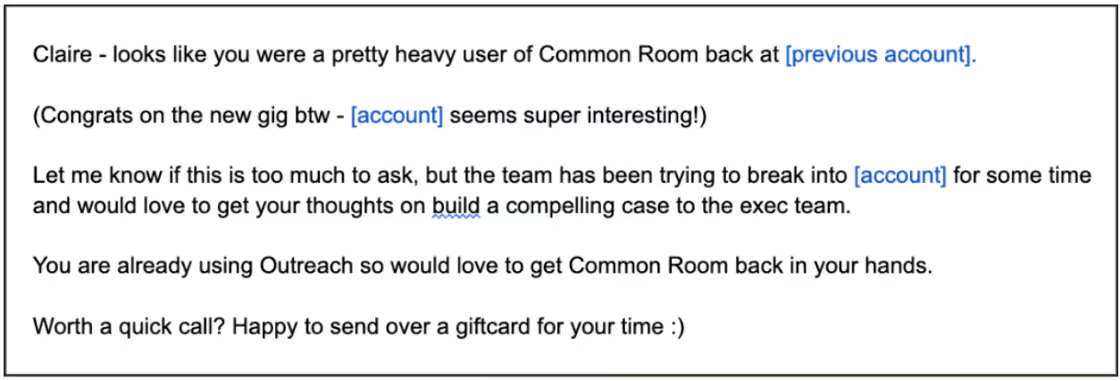
Past champions/customers convert at 3x the rate of normal leads. These are people that have already used your platform in the past and know you.
Execs also spend 70%+ of their budget within the first 100 days, so it’s crucial that you hit them up within that first 30-60 day period.
They’ll probably be already thinking about bringing in technologies and processes that will help them have impact quickly, you just need to be the solution they choose to implement.
To never miss one of those signals, make sure you set up alerts in platforms like Common Room or LinkedIn Sales Navigator to track when a past champion changes jobs or when a new executive buyer joins an org.
The job change in itself just gives you the right time, you still need to think about the account holistically and provide a good reason as to why your solution is the right one for the org.
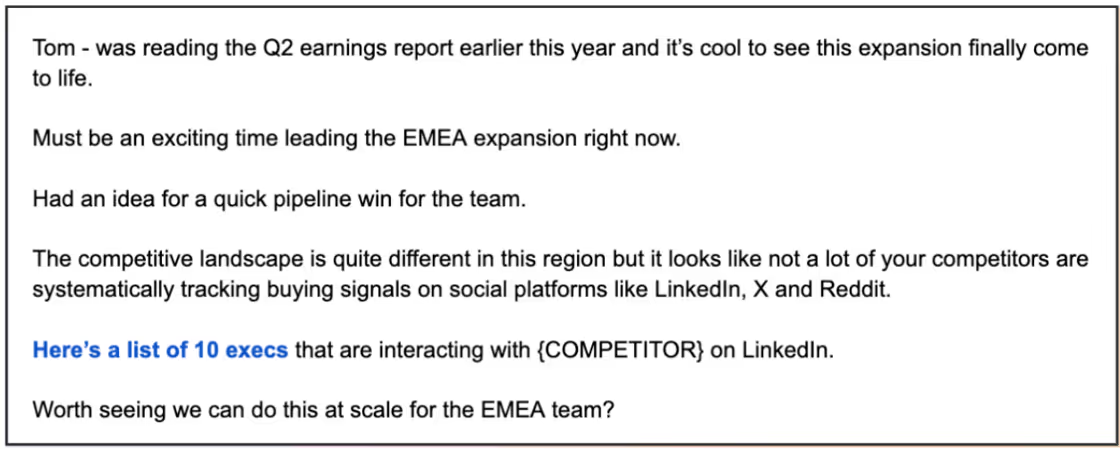
You can also “stack” other signals with job changes like I do below:
Example # 1: Previous Customer Just Switched Jobs
Example #2: Executive Moved To A New Region Where There Is Possibility To Expand
Outbound isn’t about sending more emails — it’s about sending the right ones, at the right time, to the right people. Master these three signals and you’ll never have to “get lucky” again — your timing will do the heavy lifting.
And that’s a wrap folks!
HEADLINES
Hot picks from the web
→ How to do B2B keyword research using Ubersuggest
SOFTWARE
Tool of the day
✅ Deel: You're losing 250 hours every month manually doing payroll, onboarding, and compliance. Get that time back with Deel.
That’s all for today.
Until next time,
Team B2B Whales
P.S. If you’re serious about scaling, join our Whales Club - our premium B2B community with weekly expert sessions, deal feedback, and the resources we actually use to close. Membership starts at $100/month only - cancel anytime.
